Google Search Console’s New Multimodal Search Data: What It Means for SEO and AI Search
Search is no longer defined only by what people type. Google’s new Web → Multimodal reporting gives SEO teams a new way to see how visual-led searches can lead users to web content.
Published on:
Updated on:
Published on:
Last Updated on:

Blog
Summary
Unable to load the audio. Please check the audio file URL.
Search has spent years being treated as a text-first activity. A person has a question, they type a few words into Google, results appear, and a website earns an impression or a click. That model is still important. But it no longer describes every way people search.
A user can now point a phone camera at something, use Google Lens, circle something on their screen, upload an image, or right-click an image and search from it. Google has now started exposing part of that behavior inside Search Console through a new Web → Multimodal search type.
The change is easy to misunderstand.
Multimodal search is not simply another name for AI Search. It is primarily about how a search begins, particularly when an image is used as part of the search.
And that distinction matters.
Because for SEO teams, the interesting question is no longer only “Which keywords brought people to our website?”
It is increasingly:
“What did people use to begin their search, and where did our content enter that journey?”
What Did Google Actually Add to Search Console?
On September 24, 2026, Google introduced web multimodal search reporting in Search Console. The reporting is available in the Performance report for Search results and is also incorporated into the report for Generative AI features.
The new reporting is designed to show how your content performs when users search using images.
The New Web → Multimodal Filter
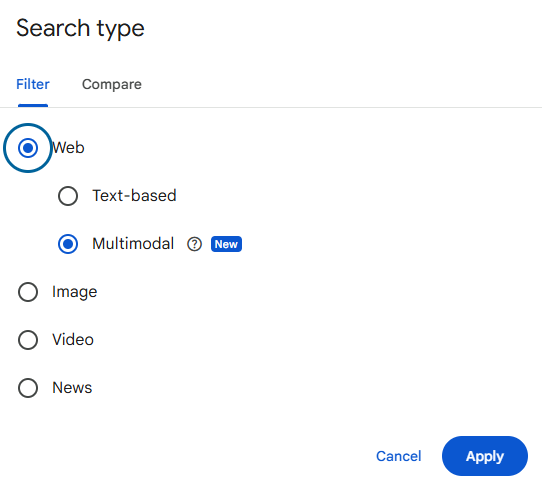
If you open the Search Console Performance report and select Search type, Web now has two categories:
Traditional search traffic originating from text queries.
Web search results where an image was used as part of the search.
Google specifically includes visual search experiences such as:
- Google Lens
- Circle to Search on Android
- Image uploads to Google Search
- Chrome’s “Search this image” feature
This is important because these interactions are not necessarily happening inside Google’s traditional Image Search.
A user can start with an image and still end up discovering a web page.
Multimodal Data in the Generative AI Report
There is another important detail.
Google has also added multimodal reporting to its Generative AI performance report.
That creates a connection between visual search and Google’s generative search experiences but it still does not mean that every multimodal search is an AI search.
The input and the search experience are two different things.
What Is Multimodal Search and How Is It Different From Image and AI Search?
The easiest way to understand the change is to separate how the user searches from where Google presents the result.
| Search type | Primary input / context | Where the result appears | What it represents |
|---|---|---|---|
| Web → Text-based | Typed text | Google Web Search | Traditional text-led search |
| Web → Multimodal | Image used as part of search | Google Web Search | Web results generated from an image-based search |
| Image | Image-search intent | Google Images | Visibility within Image Search |
| Video | Video-search intent | Google Video/Search | Visibility within video results |
| News | News-related search | Google News/Search | Visibility within news results |
| Generative AI | Search input processed through Google’s AI features | AI Overviews / AI features | Visibility within Google’s generative AI experiences |
Understand the difference in one click
InteractiveThe search includes an image or other visual input as part of the search journey.
Google uses its generative AI search experiences to present or organize information.
The user is interacting with Google’s image-search experience rather than simply using an image to initiate a web search.
The distinction can be reduced to one sentence:
Multimodal describes the search input. Generative AI describes the search experience.
That’s why Web → Multimodal should not be interpreted as “AI Search traffic.”
A person can use an image to search and receive traditional web results.
Likewise, a person can perform a text-based search and encounter a generative AI experience.
These are different dimensions of the search journey.
How Does a Multimodal Search Journey Work?
The most useful way to understand multimodal search isn’t as another Google feature.
It’s a change in the starting point of the search journey.
The search may begin with something the person sees rather than a question they have already formulated in words. It could be a product, business sign, screenshot, location, piece of text, equipment, design, or a visual problem they want to understand.
The user doesn’t necessarily need to know the right keyword. They have the thing itself.
The user can use an experience such as Google Lens, Circle to Search, an image upload, or Chrome’s “Search this image” functionality.
can become
Google then uses the visual input as part of understanding what the user is looking for.
The exact underlying systems are not something Search Console exposes to website owners, so SEOs should avoid turning this into a list of supposed “multimodal ranking factors.” What we can observe is the resulting search behavior.
The search does not necessarily stop at an image. The user can be shown web results, and that is where a website can receive visibility through Web → Multimodal reporting.
This is the important distinction from simply appearing in Google Images.
Discover → Investigate → Compare → Visit → Contact → Purchase
The visual search may only be the first step. For businesses, the original search intent may have existed before the user ever typed a keyword.
What Can SEO Teams Actually Learn From Multimodal Data?
The new report doesn’t magically reveal everything about visual search.
But it gives SEO teams something they previously couldn’t isolate in Search Console: visibility associated with web searches where an image was part of the search.
What You Can Measure
It can also be analyzed through dimensions such as pages, countries and devices, depending on the report and available data.
Questions worth asking
- Which pages are receiving multimodal impressions?
- Which pages are generating clicks?
- Is visual discovery producing meaningful traffic?
- Which types of content appear most frequently?
- Is multimodal visibility growing over time?
- Does the pattern differ from text-based search?
What you cannot see
- The actual image that triggered the search
- The same query-level visibility available for text searches
- The exact intent behind a particular visual input
Google explains that query data isn’t available for multimodal searches because these searches primarily use images rather than text.
You cannot simply ask:
“Which keyword produced this impression?”
Instead, ask:
“Which page is being discovered through this type of search, and what does that page tell us about the visual context that might be relevant?”
This makes the Pages dimension particularly interesting.
Suppose a SaaS website sees multimodal impressions concentrated around:
These pages can be especially useful for understanding where visual-led discovery is reaching the site.
These can become part of the visual context surrounding product discovery.
Comparison and integration content can show whether visual discovery is reaching deeper decision-stage content.
That doesn’t prove exactly why those pages appeared.
But it gives you a useful signal that visual-led discovery is reaching those parts of the website.
That’s where analysis becomes more valuable than simply watching the total number of impressions.
What Does Multimodal Search Change About SEO?
The biggest mistake would be to treat this as a new checklist of image optimization tricks.
The more meaningful change is conceptual.
Visual Assets Become Discovery Inputs
Images have traditionally been treated as supporting elements. They make a page attractive, explain a product, show a location, demonstrate a process, or break up long blocks of text.
Multimodal search adds another possibility:
The visual itself can become the beginning of discovery.
That doesn’t mean every image needs to be created for search. It means important visual assets deserve to be treated as part of the information architecture of a page.
Context Around the Image Matters
An image rarely exists in isolation.
Consider a product screenshot.
The image may show what the product looks like, but the surrounding page can explain:
- What the product does
- Who it is for
- What problem it solves
- Which features are shown
- How it differs from alternatives
The visual provides context. The page provides depth. For SEO, those two things should support each other.
Entity Understanding Becomes More Important
Visual search can start with something tangible: a product, a brand, a location, a business, a piece of equipment, a logo, or a physical environment.
That makes clear entity information increasingly valuable.
Your website should make it easy for search systems to understand what the thing is, who it belongs to, what it does, and where it fits.
This is not a new replacement for SEO. It is an extension of something SEO has always needed: clear, consistent information.
Search Intent Can Begin Before a Keyword Exists
This may be the most interesting shift.
With traditional search, marketers often start with the query:
“What are people searching for?”
With multimodal search, the user may begin with:
Or simply:
“Tell me more about what I’m looking at.”
The search system has to connect the visual input with possible information needs.
That means the search journey can begin before a conventional keyword is formulated.
How Should Businesses Prepare for Multimodal Search?
There is no need to create a completely separate “multimodal SEO strategy.”
Google’s announcement is about reporting and visibility; it does not publish a special set of multimodal ranking factors.
A better approach is to make your existing content clearer, more connected and more useful.
Make Visual Content Understandable
Use meaningful images where they genuinely help explain the subject.
- Product screenshots
- Before-and-after visuals
- Location photographs
- Diagrams
- Service photographs
- Original illustrations
- Interface screenshots
- Relevant charts
The goal isn’t to produce more images. It’s to make important information available visually as well as textually.
Connect Visuals With Relevant Page Content
A screenshot of a feature is more useful when the page clearly explains that feature.
A photograph of a business is more useful when the page clearly identifies the business, service and location.
A product image is more useful when the page provides accurate product information.
rather than
Strengthen Entity and Business Information
Make your important information consistent across the site.
For businesses
- Business name
- Services
- Locations
- Contact information
- Brand information
- Products
- Relevant categories
For SaaS companies
- Product name
- Product category
- Features
- Integrations
- Use cases
- Target customers
- Screenshots
- Product documentation
Keep Structured Data and On-Page Information Consistent
Structured data should support what the page actually says.
It shouldn’t be treated as a way to tell Google something that users cannot find on the page.
Visible content + structured information + relevant visual assets
Measure Instead of Guessing
This is perhaps the most important part.
Don’t assume that a particular image strategy is working because it sounds good.
Use the new Search Console data to find out whether your website is actually receiving multimodal visibility.
Multimodal readiness checklist
InteractiveHow to Analyze Multimodal Search in Google Search Console
The new report becomes much more useful when you compare it with your existing search data rather than looking at it in isolation.
Step 1 – Open Performance → Search Results
Open your Google Search Console property and go to the Performance report.
Step 2 – Select Web → Multimodal
Open the Search type filter and under Web select Multimodal.
Step 3 – Compare It With Text-Based Search
Don’t just look at the multimodal numbers. Compare them against Web → Text-based.
| Metric | Text-based | Multimodal | What to investigate |
|---|---|---|---|
| Impressions | — | — | How much visibility comes from each input type? |
| Clicks | — | — | Is visual discovery producing visits? |
| CTR | — | — | Are users clicking after visual discovery? |
| Position | — | — | How does visibility differ? |
| Top pages | — | — | Which content is being discovered? |
Step 4 – Identify Pages Receiving Multimodal Visibility
Switch to the Pages dimension and look for patterns.
Step 5 – Look for Patterns Over Time
Don’t make decisions from a few days of data. Google has only just introduced this reporting, and the rollout began globally on September 24, 2026.
That is far more meaningful than: “We got 500 multimodal impressions.”
Frequently Asked Questions About Multimodal Search

Recent Blogs
-
Why You’re Losing to Competitors
Every Month Your GBP Sits Outdated, Here’s What You’re Losing…
-
Your Google Ranking Went Up
Your Google Ranking Went Up. Here’s What That Actually Means…