Why Your Business Isn’t Showing on Google Maps: 7 Local SEO Issues to Check
If your business isn’t showing up on Google Maps, it can mean missed calls, visits, and customers. The good news? Most visibility issues can be identified and fixed.
Published on:
Updated on:
Published on:
Last Updated on:
Blog
Summary
Unable to load the audio. Please check the audio file URL.
Are you worried because customers are not able to find your business on Google Maps? On the other hand, your competitors are easily found on Google Maps; they are also attracting clicks, calls, and customers. There can be multiple reasons why customers can’t find your business on Google Maps. From an incomplete Google Business Profile to inconsistent business information and poor local relevance, several factors can affect where and whether your business appears in local search results. But don’t worry, there is good news! All these problems can be fixed in no time! In this blog, we will look at 7 common local SEO issues that could be the reason your business is not appearing on Google Maps.
Now, let us look at the problems one by one.
1. Your Google Business Profile Isn’t Fully Optimized
Are you worried because your Google business profile is not showing up on maps? The first thing you need to do is check if the profile is properly optimized or not. A complete profile provides the accurate information regarding your business and helps to understand when and how your business is relevant to local searches.
Google Business Profile optimization basically requires choosing the right primary category, writing a proper business description, adding relevant information, and keeping products and services regularly updated. These details can help to improve your Google map SEO and improve your local search visibility. Also, it’s worth nothing that an incomplete Google will automatically rank you lower, but missing information can make it difficult for Google to understand your profile. If you are still thinking about why your business is not showing on Google Maps, checking this factor could be a good starting point.
A. Is Your Listing Even Live? Duplicate & Suspended Profiles
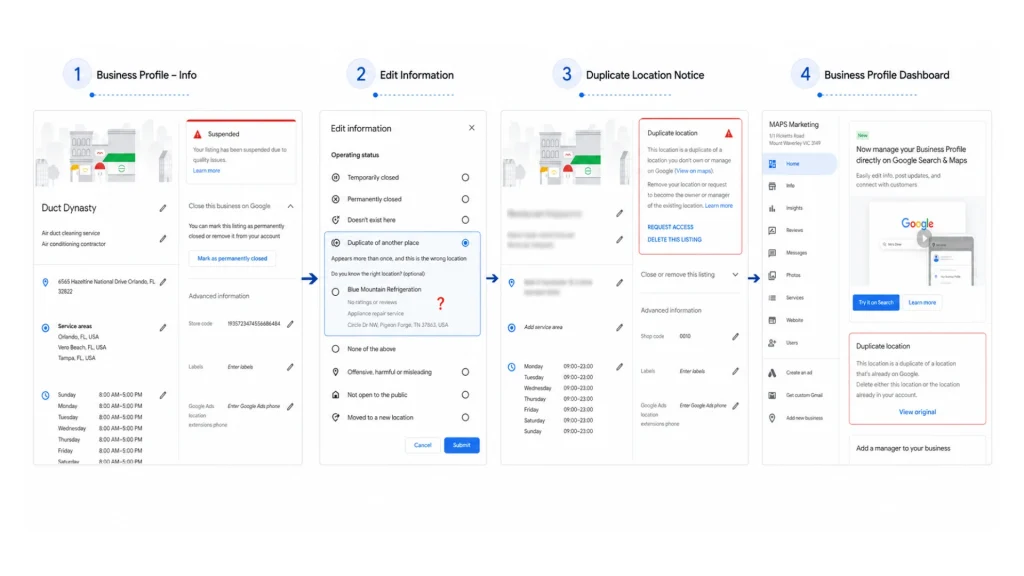
The problem does not lie in the fact that your business has a poor Google Maps ranking, your listing may not be visible at all. If your business is not showing on google maps you check if your business is having a duplicate, suspended, or disabled Google Business Profile. Duplicate Listings can divide your business information and local signals across various profiles. This can sometimes be confusing for Google and customers, especially when different profiles contain different information. A suspended or disabled profile can create more problems. If your google business profile gets suspended, your business can completely disappear from the google maps. If you’re asking “why is my business not showing on Google Maps?”, confirming that your listing is active and free from duplicate or suspension issues should be one of your first checks.
How to Check if Your Profile Is Duplicate or Suspended
Before working on your Google Maps ranking, first confirm that Google recognizes your Business Profile as an active and eligible listing. You can check for duplicate profiles and suspension issues using the following steps.
Check for Duplicate Google Business Profiles
A duplicate profile can sometimes be difficult to identify, especially when an older listing uses a previous phone number, address, or business name.
Search Your Exact Business Name
Search Google using your exact business name together with your city to find other profiles that may represent the same business.
"ABC Roofing" + Bangalore
Look through Google Search and Google Maps for multiple profiles representing the same business.
Search Using Your Phone Number
Search the exact phone number associated with your business. This can help uncover older or duplicate listings that may not appear when searching only by business name.
"0651-350-2980"
Search Using Your Business Address
Search your current business address and review the results for other Google Business Profiles associated with the same location.
"125 Main Road, Bangalore"
Compare any profiles you find with your current Business Profile.
Compare the Profiles
If you find another profile, compare the business details before assuming that it is a duplicate.
- Business name
- Business address
- Phone number
- Website
- Business category
- Physical location
If multiple profiles clearly represent the same eligible business or location, you may have a duplicate-profile issue.
Found a Duplicate?
Don’t create another profile to replace it. First determine which profile is the legitimate or verified listing and follow Google’s process for reporting or resolving duplicate profiles.
Learn How to Identify and Fix Duplicate Google Business Profiles →Check Whether Your Google Business Profile Is Suspended
A profile that doesn’t appear in Google Maps isn’t necessarily a ranking problem. It may be suspended, disabled, or restricted.
Sign In to the Google Account That Manages the Profile
Sign in to the Google account associated with your Google Business Profile and open the profile management interface.
Look for a Suspension or Restriction Notification
Check whether Google displays a notification indicating that your Business Profile has been suspended, disabled, or restricted.
Check the Email Associated With the Profile
Review the email account associated with your Business Profile for messages from Google related to your profile status.
- Suspension notifications
- Verification problems
- Business information violations
- Reinstatement instructions
- Profile restrictions
Check Whether the Profile Is Publicly Visible
Search your business name and location while logged out of your Google account or by using an incognito browser window.
If the profile isn’t publicly visible and the account also shows a suspension or restriction notification, investigate the suspension rather than treating the problem as a normal ranking issue.
Profile Suspended?
Don’t immediately create a new Business Profile. Creating another profile for the same business to bypass a suspension can make the situation more complicated. First identify the reason for the suspension and follow Google’s reinstatement process.
Learn How to Handle a Suspended Google Business Profile →2. Your Business Information Isn’t Consistent Across the Web (NAP Issues)
A local citation mentions business on websites such as online directories, local business listings, industry platforms, and community websites. These citations contain important details such as your business name, address, and phone number (NAP). Thus ensuring NAP consistency becomes an important part of your local SEO strategy. Problems generally take place when businesses use different names such as outdated addresses, incorrect phone numbers, duplicate listings, or keyword-stuffed business names across various platforms. However, NAP consistency doesn’t mean every citation needs to include identical formatting; minor differences such as “Road” and “Rd.” are generally less important than having accurate and matching business information. Primarily a strong citation strategy focuses on authoritative U.S. directories, relevant industry websites, local organizations, and trusted platforms instead of focusing on creating hundreds of low quality listings. Following the procedure of regular auditing and updating your citations can help maintain a reliable online business presence. It will further strengthen the foundation of your local SEO efforts too.
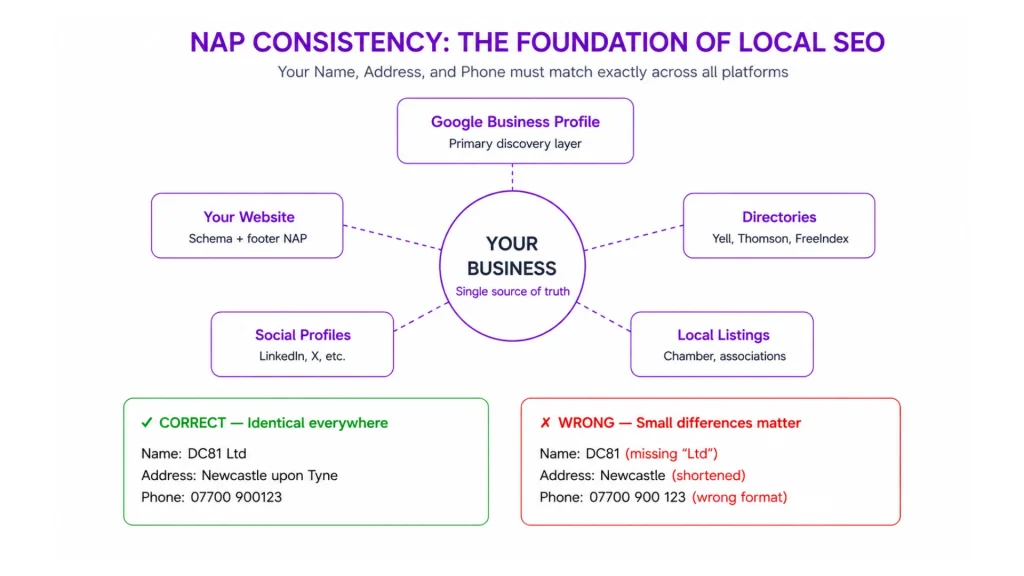
Check These NAP Parameters
Below checklist can identify whether inconsistent business information can affect your local presence.
Check whether your Google Business Profile, website, directories, and other listings show the current business address.
Check whether all your business listings are using the correct phone number or not.
Always search major dictionaries to ensure the same businesses haven’t been listed multiple times.
Always check for previous business names, addresses, phone numbers, or outdated websites that might come on third- party dictionaries.
Do not insert the target keyword into your business name just because you want it to rank it.
It is not important to submit your business to every directory you can find. Always remember to give importance to authoritative, local, and industry-specific platforms.
Learn how to audit your NAP, fix citation issues, handle duplicate listings, and build a stronger local citation profile.
Read the Complete NAP & Local Citation Guide →3. Your Business Has Weak or Insufficient Reviews
Reviews play an important role in your Google Maps Ranking and local business visibility. Customers won’t choose a business with very few reviews, an old collection of reviews, or a lower star rating than its competitors. Review recency can also be taken into consideration. A consistent flow of genuine reviews can show that your business is actively getting new customers. Your review response rate is also important for customer engagement. It is important to pay attention to both positive and negative reviews to learn about customer feedback.
Google Review Gap Calculator
Compare your review profile with your competitor. Then decide how many additional reviews you need to reach your target.rating.
Your Business
Competitor
Your Target
This is the average rating you expect from your future genuine reviews.
Your Review Gap
Here’s how your review profile compares.
4. Your Competitors Have Stronger Local Signals
Sometimes despite your Google Business Profile being set up, your information being accurate and despite following good SEO practices, your competitors can appear above on google maps. Therefore, It might appear that business is not showing on Google Maps. Strong local signals contain more genuine reviews, a more complete Google Business Profile, relevant local backlinks and citations, and useful geo-relevant content. We also need to take into consideration proximity. Google sees how close a business is to the person searching. A well- optimized profile still might not be first in every search if another relevant business is closer to the searcher.
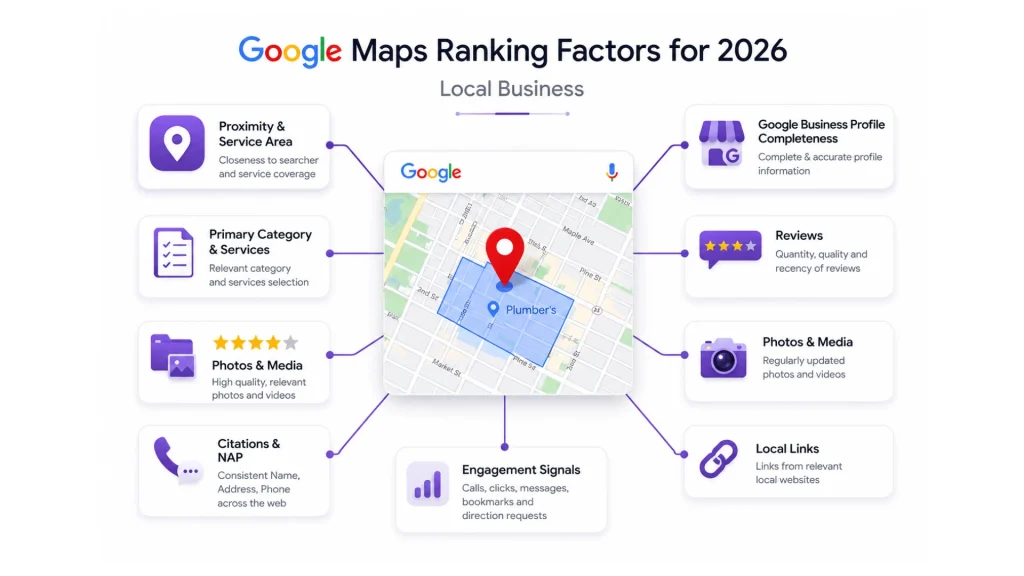
Before concluding that your competitor has better SEO, you need to compare the local signals Google can see for both businesses. Now you need to choose a competitor that appears above you for the same local search, then compare the areas below to identify the gaps.
Compare Your Google Business Profile With a Competitor
Compare the areas below with a competitor that consistently appears above you in Google Maps. The goal isn’t to copy every element of another profile, but to identify meaningful gaps you can improve.
| Local Signal | Your Profile | Competitor Profile | What to Check | Priority |
|---|---|---|---|---|
| Primary Category | Roofing Contractor | Roofing Contractor | Is your primary category equally relevant to the main service you provide? | Competitive |
| Secondary Categories | 2 | 4 | Does your profile accurately represent other important services or business types you offer? This can influence your Google Maps ranking. | Review |
| Services | 8 services | 18 services | Are important services missing from your Business Profile? | Improve |
| Review Count | 120 | 350 | Is there a significant difference in the number of genuine customer reviews? | Significant Gap |
| Average Rating | 4.4 ★ | 4.8 ★ | Is your average rating competitive with businesses appearing above you? | Significant Gap |
| Recent Reviews | 3 this month | 16 this month | Is your business receiving genuine reviews regularly, or are your latest reviews months old? | Significant Gap |
| Review Responses | 60% | 95% | Are reviews being responded to consistently and professionally? | Improve |
| Profile Photos | 35 | 140 | Does your profile have enough relevant, high-quality photos to represent the business? | Improve |
| Recent Photos | 2 this month | 15 this month | Is your profile being kept visually current? | Improve |
| Business Description | Complete | Complete | Does your description clearly explain what the business offers without keyword stuffing? | Competitive |
| Relevant Citations | 12 | 31 | Are you listed on relevant industry, local, and authoritative directories? | Significant Gap |
| Local Mentions | Few | Several | Is your business mentioned by relevant local organizations, publications, or community websites? | Improve |
| Location / Service Content | 2 pages | 7 pages | Does your website demonstrate useful expertise about your services and the locations you serve? | Improve |
| Relevant Local Links | 5 | 16 | Does your business have relevant links or mentions from legitimate local and industry websites? | Significant Gap |
| Website Support | Service pages | Service + location pages | Does your website clearly support the services and locations represented in your Business Profile? | Review |
| Proximity | 4.5 miles | 1.2 miles | Is the competitor physically closer to the searcher? Search visibility can vary based on where the search is performed. | Limited Control |
How to Read This Comparison
A difference in one area does not automatically mean that your competitor will rank higher. Instead, look for patterns. If a competitor consistently has stronger reviews, a more complete profile, more relevant local mentions, and stronger location-focused content, those combined differences may indicate a stronger local presence.
Focus on the gaps you can realistically improve rather than trying to copy every element of a competing profile.
5. Your GBP Categories and Services Aren’t Properly Configured
Your Google Business Profile Categories and services helps your customers to know what your business does and which services customers can easily find those local searches. Choosing the right category, adding genuine services, and keeping your profile at par with your website can make it easier for google to understand your business quickly. This is an integral aspect of Google Business Profile optimization.
Why Your Primary Category Matters
The primary category’s main aim is to show the core business represented by your Google Business Profile. It basically describes what your business primarily does rather than simply acting as another place to include a target keyword. Choosing the right category can improve your google map ranking.
Never choose a category just because it contains a keyword you want to rank. If the category does not correctly represent the business, adding it merely for SEO purposes can create a wrong profile and affect your local SEO.
What Your Business Mainly Is
The main job of the primary category is to describe the type of business customers are dealing with. This is an important part of Google Business Profile optimization.
Other Genuine Business Offerings
Secondary categories can help represent many legitimate objects of the business when known categories are available and applied properly. Choosing right category can also improve our local search visibility .
Category vs. Service: What’s the Difference?
An easy way to understand the relationship is that your category will describe the type of business, while your service will describe the exact work customers can receive. This distinction is necessary for effective Google Business Profile optimization.
How to Map Services to Your Business Category
Add services that your business genuinely provides and that are relevant to the category and customers you want to reach. Don’t add unrelated services simply to increase the number of entries in your profile. This approach helps your local SEO to stay relevant.
HVAC Contractor
- AC Repair
- Furnace Repair
- HVAC Installation
- Air Conditioning Maintenance
Plumber
- Drain Cleaning
- Leak Repair
- Water Heater Repair
- Sewer Line Repair
Dentist
- Teeth Cleaning
- Dental Implants
- Root Canal Treatment
- Dental Crowns
Roofing Contractor
- Roof Repair
- Roof Replacement
- Roof Inspection
- Roof Installation
Attorney
- Personal Injury
- Family Law
- Estate Planning
- Business Law
Auto Repair Shop
- Brake Repair
- Oil Change
- Engine Diagnostics
- Transmission Repair
If your business doesn’t actually offer a service, don’t add it just to target another search. Your GBP should be accurate and it should represent what customers can purchase or receive for your business. This also keeps your profile relevant for Google Maps SEO.
Write Your Business Description Naturally
Your business profile description should help customers to understand what the business does, things it offers and when it operates when appropriate. Right technology should be used naturally but unnecessary repeating keywords can make the description very difficult for the audience to read. A clear description also helps to improve local search visibility and helps communicate relevant local ranking factors without keyword stuffing.
Best roofing contractor in Bangalore, best roof repair Bangalore, Bangalore roofing company, roofing services Bangalore, best roofing services in Bangalore, Bangalore roof repair company.
Repeated keywords make the copy unnatural.ABC Roofing provides residential roof installation, roof replacement, inspections, and emergency roof repair for homeowners in Bangalore and surrounding communities.
Clear business information with relevant terminology.Align Your GBP, Services, and Website
Your Google profile and website needs to describe the same real world business. Our aim isn’t to repeat identical keywords everywhere but to make the relationship between your business, services and website clearer and easier for people to understand. This is an integral part of Google Business Optimization.
Your GBP doesn’t need to repeat the same keyword in every field. Instead, make sure the categories, services, description, and website collectively describe the same business accurately.
Common Category and Service Configuration Mistakes
Many businesses make their GBP less useful by trying to optimize every field for keywords rather than accurately describing the business. This can weaken your local SEO efforts.
Choose a category that will best represent your regal business instead of chasing a keyword to support your Google Maps SEO.
More categories does not mean more visibility. Use only categories that genuinely apply. Relevant categories are an important part of Google Maps SEO.
Don’t listen to services your business doesn’t provide only to target additional searches. Maintaining the accuracy of the profile to support local search visibility too.
Use relevant terminology naturally while keeping the description useful and readable.
Your website should accurately support the services and business information represented in your GBP.
Don’t create services or location claims that don’t represent what the business genuinely offers.
GBP Category & Service Audit
Before moving on, check whether your profile passes each of these basic configuration checks.
6. Your Website Isn’t Supporting Your Local Presence
Your Google Business Profile does not work alone. Your website can provide additional information about your business, service, location and expertise. If your website is missing important local information or contradicts your business profile, you are definitely missing the golden opportunity to strengthen your overall local search visibility.
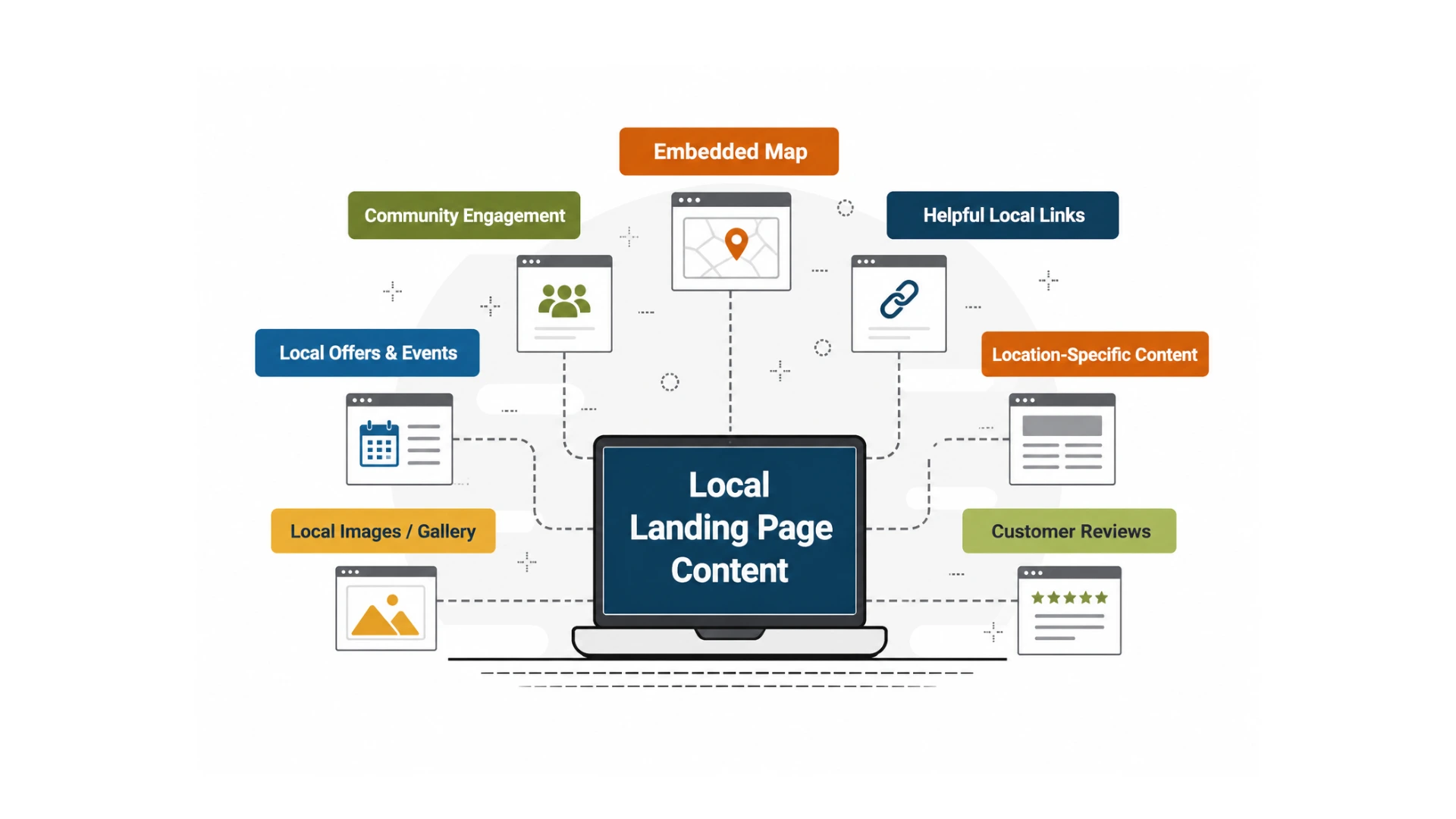
Does your website explain what you operate?
If your business covers specific areas, your website should make the service coverage clear. However, creating dozens of near-identical city pages, just by replacing the city name can create repetitive content.
Roofing Services in Bangalore
We are the best roofing company in Bangalore. We provide roofing services in Bangalore and offer the best roofing solutions in Bangalore.
Mostly the same content repeated with the city name changed.Roofing Services in Bangalore
ABC Roofing provides residential roof repair, replacement, inspections, and installation for homeowners in Bangalore and surrounding communities. Our team works with local homeowners on storm damage assessments, roof maintenance, and replacement projects.
Provides useful information about the actual service and location.A useful location page should provide genuine information about the services you offer in that area. Where appropriate, include local examples, service details, relevant areas served, directions, or other information that helps customers.
Does Your Website Support Your Business Information?
Your website should showcase the same real-world business as your Google Business Profile. The formatting does not have to be the same everywhere but the main business information should be correct and consistent. This can support your Local SEO and Google Maps SEO efforts.
Is Your Local Business Structured Data Correct?
Structured data gives search engines machine-readable information about your business. For a local business, relevant structured data can describe information such as the business name, address, phone number, website, and opening hours.
Adding LocalBusiness structured data does not guarantee higher Google Maps rankings or a rich result. Its purpose is to provide structured information that search engines can interpret and validate against the visible information on your website.
Does Your Website Clearly Communicate Your Location?
Your location information should match the way your business actually operates. A storefront business and a service-area business should communicate their business locations separately.
Customers Visit Your Location
- Display the real business address
- Provide useful directions
- Include parking or access information where useful
- Show relevant location details
- An embedded map can be useful for visitors
You Travel to Customers
- Clearly explain the areas genuinely served
- Describe the services available in those areas
- Don’t create a fake storefront location
- Don’t use an address where customers aren’t actually served
- Use useful service-area information instead
Your website should reflect the real-world way your business operates. Creating fake offices, addresses, or location pages simply to appear relevant to additional cities can create inaccurate information.
Does Your Website Have Relevant Local or Industry Mentions?
Local authority can’t be built just by collecting hundreds of random links. Tool for genuine opportunities where your business is relevant to a local community, organization, publication, or industry.
Community Sources
- Chambers of Commerce
- Local business associations
- Community organizations
- Local publications
- Local events
Industry Sources
- Trade associations
- Professional organizations
- Industry publications
- Relevant suppliers
- Business partnerships
Local Involvement
- Community sponsorships
- Charitable initiatives
- Local programs
- Educational events
- Community partnerships
A smaller number of legitimate local or industry mentions can be more useful than a large collection of unrelated, low-quality directory links. Don’t build links simply to increase a backlink count.
Build a Website Structure That Supports Local Search
The job of your website is to make the relationship between your business, services, and locations easy for your audience to understand. The structure should clearly showcase how your business actually operates.
A useful website structure helps customers find the service they need and understand where you operate. Don’t create hundreds of thin service-area pages simply to target more city keywords.
Local Website Support Audit
Use this quick audit to identify whether your website is supporting your Google Business Profile.
7. You’re Not Tracking Your Local Visibility
Checking your Google Maps doesn’t really tell you how visible your business is to the audience. Local Search results depend on various factors such as searcher’s location, search query, competition, and other other local ranking factors. To understand whether your local SEO efforts are relevant and working or not, you need to check your visibility and the actions customers take after finding your business.
Why Checking Your Ranking Once Isn’t Enough
Local rankings do not appear the same for every searcher. A business can appear prominently for a search performed nearby to its location but appear lower when the same search is performed from another part of the city. This is why Google Maps ranking needs to be monitored across relevant locations and searches.
What Should You Track?
Local SEO doesn’t only show where your business ranks. It tracks both your local search visibility and the actions people take after knowing your business.
Track the Searches That Actually Matter
Don’t just monitor one keyword from one location only and think it represents your entire visibility. You need to track your most important services and the locations you actually serve. This gives you a correct picture of your Google Maps SEO performance.
Use the Right Tools for the Right Data
Different tools know how to answer different questions. A ranking tracker can show where you appear for local searches, while your Business Profile performance data can help you understand what customers do after finding you.
Local Ranking Tools
Tools such as local rank trackers can help you monitor your position across different search locations and keywords.
Google Business Profile Data
Use the performance information available for your Business Profile to understand profile interactions, searches, calls, website visits, and other available customer actions.
See Where Your Business Appears in Local Search
Don’t rely on a single Google search to judge your local visibility. Check your local rankings across relevant keywords and locations to identify where your business is visible and where there may be opportunities to improve.
Check Your Local Rankings →How to Fix These Issues: A Quick Action Checklist
Don’t try to fix everything at once. Start with the issues that can stop your business from being properly understood. Then, improve the signals that can strengthen your local business. Use this checklist to turn the problems covered in this guide into practical next steps.
Claim, Verify & Fix Your Google Business Profile
Make sure the correct Business Profile is claimed, verified, active, and complete. Check for suspension, duplicate profiles, incorrect information, and missing business details.
Check for Duplicate or Suspended Profiles
Search your business name, phone number, and address to identify duplicate listings. If your profile is suspended, investigate the reason and follow Google’s reinstatement process instead of creating another profile.
Audit Your NAP & Business Citations
Check your business name, address, and phone number across important directories, social profiles, industry platforms, and local sources. Correct outdated information and resolve duplicate or irrelevant listings.
Build a Consistent Review Process
Ask genuine customers for reviews consistently, monitor new feedback, and respond to reviews professionally. Focus on building a steady stream of authentic customer feedback rather than trying to generate reviews in bulk.
Compare Your Local Signals With Competitors
Compare relevant competitors across reviews, profile completeness, categories, services, website content, citations, and other legitimate local signals. Look for specific gaps rather than copying everything competitors do.
Review Your GBP Categories & Services
Make sure your primary category accurately represents your core business. Add relevant secondary categories and genuine services without keyword stuffing or adding offerings you don’t actually provide.
Strengthen Your Website’s Local Signals
Make your services and locations clear, keep business information accurate, implement relevant structured data, improve useful local content, and earn legitimate local or industry mentions.
Track Your Local Rankings & Customer Actions
Monitor important keywords across relevant locations instead of checking your ranking once. Track local visibility alongside profile interactions such as calls, website visits, and direction requests where available.
The problem isn’t always that your business isn’t good enough. Sometimes, Google simply doesn’t have enough consistent information and local signals to confidently understand, trust, and surface your business for relevant searches.
Start by fixing the fundamentals, strengthen the signals that matter, and then track how your visibility changes over time. Local SEO is not a one-time optimization-it is an ongoing process of improving how your business is understood and discovered.
Find Out Why Your Business Isn’t Showing Where It Should
Check your local search visibility and identify where your business is appearing, and where you may have opportunities to improve.

Recent Blogs
-
Why You’re Losing to Competitors
Every Month Your GBP Sits Outdated, Here’s What You’re Losing…
-
Google Search Console Multimodal Search
Google Search Console’s New Multimodal Search Data: What It Means…