Google Business Profile “Collected Info”: What It Is, How It Works & Why It Matters for Local SEO
Google Business Profile Collected Info is changing how businesses can understand the information Google gathers about their business through automated interactions. Here’s what it is, how it works, where to find it, and why it matters for Local SEO.
Published on:
Updated on:
Published on:
Last Updated on:
Blog
Summary
Unable to load the audio. Please check the audio file URL.
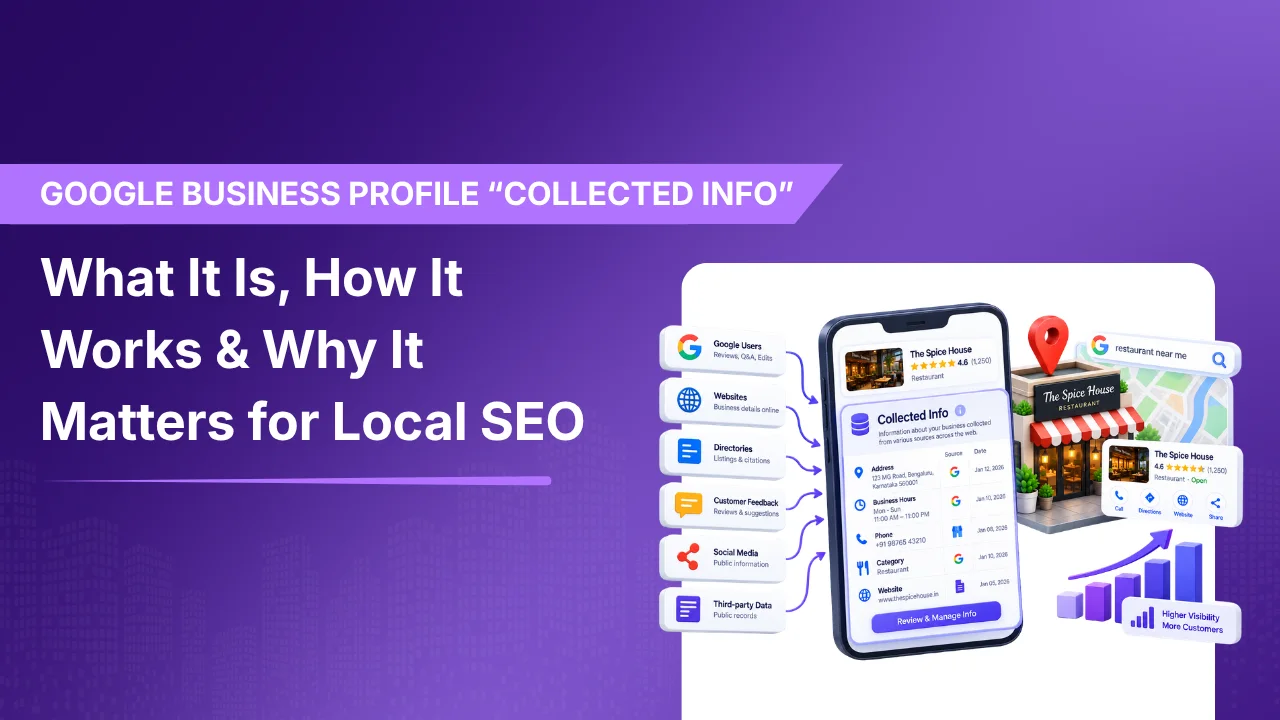
Google is changing the way businesses manage their information on Google Search and Maps. Inside some Google Business Profiles (GBP), a new section has come up known as “Collected Info”. The main aim is to give business owners a way to see information that Google has gathered through its automated interactions with the business. This one is especially useful for Local SEO because the information Google uses to understand a local business isn’t specifically limited to only what the owner manually enters into the Business Profile. Google can receive information through automated calls, text messages, or WhatsApp conversations with the verified business phone number.Information can be reviewed, seen when and where it came from by the business owners. They can even delete collected information when required.
What Is “Collected Info” in Google Business Profile?
Collected info is information Google has gathered about a business through its interactions with that business.
Google says it may occasionally contact the verified phone number associated with a Business Profile through an automated phone call, text message, or WhatsApp message to confirm business details. Information provided in response may then be used to update the Business Profile.
For example, Google may want to confirm whether a business:
Offers a particular service
Provides a specific type of appointment
Has certain operating arrangements
Accepts walk-ins
Provides customer parking
Has other business details that may help Google answer local searches
Google’s Business Profile community has also given examples such as confirming curbside pickup, dedicated customer parking, and walk-in availability. To sum up, Google isn’t relying only on information manually entered by the business owner.
Where Can You Find “Collected Info”?
Collected info is information Google has gathered about a business through its interactions with that business.
If the feature is available for your Business Profile, then according to Google you can access it through:
Google Search → Your Business Profile → Edit profile → Collected info
From there, you can review the entire information Google has collected.
Google says the interface can show:
The collected information
The source of the information
The date it was collected
If the collected information is incorrect, you can delete the information too.
What if You Don’t See It?
Don’t just automatically think your GBP has a problem.
Google clearly says that Collected info is currently available only for selected regions, languages, and business categories. It simply means that feature will not appear for every business.
The feature has also been reported as a recent rollout, with Google officially announcing the Collected info tab in September 2026
Why Is Google Collecting This Information?
The most important feature is to keep Business Profiles accurate and useful for people searching locally.
Imagine someone is searching
“Dentist open now near me”
or:
“Auto repair shop that accepts walk-ins”
Google needs proper information to determine which businesses are reliable. Business information can determine how Google can understand a business and what information it can provide to searches.
Google states that Business Profile information is used to help surface relevant local search results across Google Search and Google Maps.
However, it’s important not to confuse Collected info with a direct local ranking factor.
Google’s documentation does not say that having more collected information will automatically improve rankings.
The more trustworthy interpretation is that accurate business information helps Google understand the business and provide relevant information to searchers.
How Does Google Collect This Information?
Google already uses multiple sources to build and maintain Business Profile information.
Google uses a number of different sources to build and maintain Business Profile information.
According to Google, information can come from:
Information provided by the business
Publicly available information, such as the business website
Licensed third-party data
User contributions
Information gathered through Google’s interactions with a local business
The new Collected info interface provides more visibility into one part of this process.
Google may contact the business using an automated system and ask questions about factual business information.
Example
Imagine a dental clinic has a Google Business Profile. Google’s automated system contacts the clinic’s verified phone number and asks whether the clinic provides emergency dental appointments or not. Someone at the front desk of the clinic confirms that it does. That information may naturally become part of the information Google uses for the Business Profile. The new Collected info section can provide visibility into information collected through these interactions, including its source and collection date.
What Happens If Google Collects Incorrect Information?
This is where the feature becomes important for business owners and local SEO professionals.
Imagine a restaurant that used to offer delivery service but later stopped doing so.
Google’s automated system later asks whether delivery is available, and someone accidentally confirms the old information.
Google’s
That creates a potential accuracy problem.
With Collected info, the business can identify the information Google collected and delete it if necessary.
Another Example
Suppose an auto repair shop:
Does not provide towing
Does not offer 24/7 service
Does not accept walk-ins
During an automated reaction only, inaccurate information gets confirmed.
This is the reason businesses need to review their GBP information periodically rather than just thinking that whatever is shown by Google originated from the owner.
Does Deleting Collected Info Change Your GBP?
There is a difference that is worth noting here.
Google says that deleting collected information removes that information from Google’s records, but it does not necessarily change other information already displayed on your Business Profile.
For example, deleting collected information doesn’t mean you should ignore an incorrect service, business hour, or other field currently displayed on your profile.
If a live GBP field is wrong, review and correct the actual Business Profile information as well.
This distinction is important because “removing collected information” and “editing your published Business Profile” are not necessarily the same action.
Google says that deleting collected information also removes that information from Google’s records as well.
Can Google Call Your Business Automatically?
Yes.
Google’s documentation says that it can use automated calls or texts to contact the phone number associated with your business profile. These interactions are often used to confirm business details or, in some cases, assist customers with requests.
For example, Google may contact a business about:
Operating hours
Service availability
Customer requests
Appointment-related information
Other business details
Google explicitly warns businesses that it will never ask for payment, credit card information or account passwords with the help of these automated interactions. So if someone tries to contact you claiming to be Google, and asks for payment with the motive “ to keep your business on Google’ then it should be treated as suspicious.
What Does This Mean for Local SEO?
The introduction of Collected info brings an important change in local search:
Nowadays, Google is building its understanding of businesses from not a single source, but multiple information sources.
Your website, GBP, third-party data, customer contributions and Google’s own interactions can all contribute to the information Google associates with a business.
For local SEO professionals, maintenance of consistent and accurate business information becomes even more important.
A practical GBP checklist
Regularly check:
Make sure the real-world business name is accurate.
Ensure they accurately represent the business.
Review whether listed services are still offered.
Check regular, holiday and special hours.
Make sure the verified number is controlled by the business.
Keep important business information consistent with the website.
If the feature is available, periodically review what Google has collected.
This doesn’t mean businesses should try to manipulate every possible signal. The goal should be accurate, consistent and useful information.
Does “Collected Info” Improve Google Rankings?
There is currently no Google statement saying that simply having more information inside the Collected info section is a direct ranking boost.
We don’t have any Google Statement saying that just having more information inside the Collected info section with naturally increase the Google ranking too.
So avoid making claims such as:
“Collected info is a new Google ranking factor.”
A more accurate statement is:
Collected info gives businesses more visibility into information Google has gathered about them and provides another way to identify potentially inaccurate data.
Google’s local search documentation explains that business information helps Google surface relevant local results, but it does not identify the Collected info feature itself as a ranking factor.
The Bigger Change: Google Is Building a Richer Business Understanding
The newest dashboard tab isn’t the only interesting part of this update, There are more features to look out for.
The feature gives us information about how Google understands local businesses.
A Business Profile is no longer just a form where a business owner enters:
Name → Address → Phone → Hours → Category
Google combines information from multiple sources to create a broader understanding of a business.
The Collected info feature gives businesses a small window into that process.
For local businesses, the practical takeaway is simple:
Don’t only optimize what you enter into your GBP. Monitor what Google understands about your business.
As Google continues developing Search, Maps and AI-driven experiences, accurate business information will remain important for helping search systems understand who you are, what you offer, where you operate and which customers you serve.
Final Takeaway
Google’s new Collected info feature gives eligible businesses greater visibility into information gathered through Google’s automated interactions.
You can use it to:
See what information Google collected
Check the source and collection date
Identify potentially outdated information
Delete collected information when necessary
Better understand how Google is building its view of your business
The feature is still rolling out and isn’t available to every Business Profile. But for businesses and Local SEO professionals who do have access, it is worth checking regularly.
Google is not just reading the information you provide. It’s also gathering and validating information about your business. Collected info gives you a way to see part of that process.
As Google continues developing Search, Maps and AI-driven experiences, accurate business information will help customers understand who you are, what you offer, where you operate and which customers you serve.
Where are you with Google’s Collected Info?
Choose the situation that best describes your Business Profile.
Run a quick GBP accuracy check
Tick the items you have reviewed. Your progress updates automatically.

Recent Blogs
-
Why You’re Losing to Competitors
Every Month Your GBP Sits Outdated, Here’s What You’re Losing…
-
Google Search Console Multimodal Search
Google Search Console’s New Multimodal Search Data: What It Means…