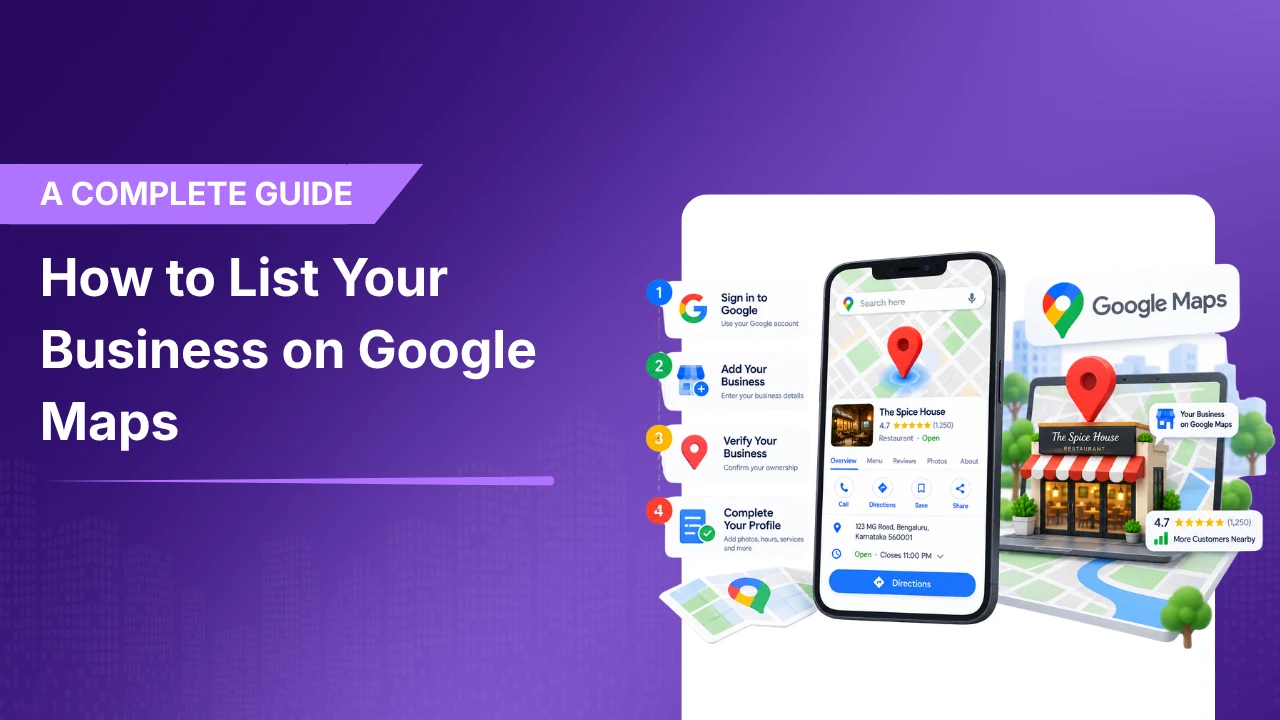
How to List Your Business on Google Maps: A Complete Guide
The blog walks readers through the complete process, starting with checking whether a business already exists on Google Maps, then creating or claiming the listing, completing verification, and providing accurate business information.
Published on:
Updated on:
Published on:
Last Updated on:
Blog
Summary
Unable to load the audio. Please check the audio file URL.
The blog gives readers thorough information regarding the full process, from checking whether a business already exists on Google Maps or not, then creating the listing, completing verification, and providing accurate business information.
The process begins with creating a Google Business Profile. Once your profile gets verified, you can manage how your information comes across Google Search and Google Maps.
It doesn’t matter if you are trying to list your business on google maps, find your business on Google Maps, or trying to improve your ranking on google maps this guide will explain everything to you step by step.
Where are you with Google Maps?
Choose the situation that best describes your business. We’ll point you toward the right next step.
1. What Is a Google Maps Business Listing?
Google Map Business listing is the business information that customers generally see when they search for your business or any relevant local services on Google Search and Google Maps.
But today it is your Google Business Profile that manages the information.
Depending on your business, your profile can display information such as:
- Business name
- Address or service area
- Phone number
- Website
- Business hours
- Business category
- Photos and videos
- Customer reviews
- Services
- Business attributes
- Appointment, booking, or other relevant links
2. Why Your Business Should Be on Google Maps
Having your business listed on Google Maps is a great help to customers as it helps them to find and evaluate your business, if they are searching for products and services locally.
Your Google Business Profile can help customers:
- Find your business location
- Call your business
- Visit your website
- Check your hours
- Read customer reviews
- View photos
- Learn about your services
- Get directions
- Take actions such as booking an appointment when supported
Being listed on Google Maps and ranking prominently on Google Maps are two different things. Creating a listing is only the first step.
3. How to List Your Business on Google Maps
If your business does not already have a business profile, you can easily create one through Google’s Business Profile system.
Check whether your business already exists
Before creating any new listing, try to find your business name on google. It can be possible that Google has created an unverified profile for your business.
If an existing profile is already available, it’s better to claim that one rather than creating any duplicate listing.
Add your business if it does not exist
If you are unable to find an existing profile, you can add your business easily through Google’s Business Profile setup.
You may need to provide your business name, category, location or service area, phone number, website, and other requested information.
Provide accurate business information
You always have to ensure the information you enter actually represents your actual business. Give particular attention to your business name, address, phone number, primary category, hours, and service area.
4. How to Claim Your Existing Business Listing
Sometimes you might see that your business is already on google map, even though you did not create the profile yourself.
If you find an unverified listing, you can claim it.
- Open Google Maps.
- Search for your business name and location.
- Select the correct business.
- Choose Claim this business.
- Select Manage now.
- Follow Google’s verification instructions.
Do not create duplicate profiles simply because you cannot immediately access an existing listing.
5. How to Verify Your Business
Verification confirms to Google that you are authorized to manage the business.
Now Google decides which verification methods are available for a particular business. Depending on the business and circumstances, available options can differ.
Once verification is completed, you can manage your business profile and if you want, you can also make changes to the information provided on Google.
Why Verification Matters
A verified profile gives you control over your business information and helps prevent unauthorized changes.
6. How to Optimize Your Google Business Profile
Creating a Google Maps Business Listing is just the beginning of the story. Once your profile is verified, make sure the information is complete, accurate, and useful to customers.
Complete Your Core Business Information
Review your:
- Business name
- Primary category
- Additional categories where appropriate
- Address
- Service area
- Phone number
- Website
- Hours
- Business description
Add Relevant Photos and Videos
Use high-quality, authentic images that help customers understand your business.
- Exterior photos
- Interior photos
- Products
- Services
- Team members
- Equipment
- Completed work
Add Relevant Business Attributes
Attributes can communicate useful details about your business, such as amenities, payment options, or other characteristics relevant to your category.
Add Useful Customer-Action Links
Depending on your business category, you may be able to add links for actions such as appointments, reservations, ordering, or other customer activities.
How healthy is your Google Business Profile?
Check the items you’ve already completed. Your score updates automatically.
7. How Google Maps Rankings Work
Getting your business on google map and ranking appropriately on google maps are different things.
A listing can exist without appearing prominently for every local search.
Local results are primarily influenced by relevance, distance, and prominence.
What influences local visibility?
Move the sliders to see how the three major local-search factors can change the overall score. This is an educational model, not Google’s actual ranking formula.
Relevance
Relevance refers to how well your Business Profile matches what someone is searching for.
Distance
Distance considers how far a business is from the location associated with the search.
Prominence
Prominence talks about how well- known or established the business is. They can be influenced by signals Google has about the business and its broader presence.
There is no legitimate shortcut that guarantees a business will rank first on Google Maps.
8. Common Google Maps Listing Mistakes
Just by creating a profile one cannot conclude that you have created a strong local presence.
9. How Reviews Affect Your Google Maps Presence
Reviews are one of the most important parts of a Google Maps Business listing. Customers often use reviews to assess a business before contacting it.
A strong review management process should include:
- Asking genuine customers for reviews
- Monitoring new reviews
- Responding professionally
- Addressing legitimate customer concerns
- Identifying recurring feedback
- Avoiding fake or incentivized reviews
Your aim should not be to collect as many reviews as possible. Instead, your goal should be to build a consistent and authentic review collection process while providing customers with a good experience.
Follow the customer journey
A strong local presence should move customers through more than just a ranking position.
10. How to Manage Your Business on Google Maps
After your business is listed and verified, you can manage important information directly through your Google Business Profile.
Regular management can include:
- Updating business information
- Changing hours
- Adding photos
- Managing services
- Responding to reviews
- Updating business attributes
- Managing customer-action links
- Monitoring profile performance
For businesses with multiple locations, you can use bulk management tools and easily manage profiles at scale.
11. How to Track Your Google Maps Performance
Creating a listing is not sufficient. You need to understand how customers are discovering and interacting with your profile.
Depending on your profile and available reporting, you can monitor:
- Searches
- Profile views
- Customer interactions
- Website actions
- Calls
- Other available customer actions
Don’t focus only on rankings. Look at whether visibility is actually creating meaningful customer actions.
12. Frequently Asked Questions
Getting Listed Is Only the Beginning
Getting your business on Google Maps is an important first step in building a local search presence, but creating a listing is not the same as optimizing it.
Start by creating or claiming the correct Google Business Profile, verify the business, provide accurate information, add useful content, manage customer reviews, and regularly monitor performance.
For businesses with multiple locations, the challenge becomes even greater. Each location needs accurate information, consistent management, and ongoing review monitoring.
The goal isn’t simply to have your business on Google Maps. It’s to build a Business Profile that customers can trust and that supports your broader local SEO strategy.

Recent Blogs
-
Why You’re Losing to Competitors
Every Month Your GBP Sits Outdated, Here’s What You’re Losing…
-
Google Search Console Multimodal Search
Google Search Console’s New Multimodal Search Data: What It Means…